Amazon / Operations
How to Optimize Amazon Product Listings
// the listing has to rank and convert, or the ads just burn money

By Fracto Solutions
September 16, 2026
The short answer
To optimize an Amazon product listing, make it rank in Amazon search and convert the click: a keyword-rich title, high-quality images (including infographics), scannable bullet points, backend search terms, A+ content, and genuine reviews. Amazon’s algorithm rewards listings that sell, so conversion and relevance reinforce each other. A weak listing also wastes every dollar you spend on Amazon ads.
2
jobs: rank in Amazon search AND convert the click
A9/A10
Amazon’s algorithm rewards listings that sell
Listing
first, or every ad dollar burns on a page that won’t convert
What makes an Amazon listing rank and convert?
An Amazon listing has to do two jobs at once: rank in Amazon’s search results (through relevant keywords and strong sales performance) and convert the shopper who clicks (through clear images, persuasive copy, and reviews). The two reinforce each other, because Amazon rewards listings that sell.
This dual job is the key to understanding Amazon optimization. Amazon’s search algorithm (often called A9/A10) is built to make Amazon money, so it favors listings that convert, not just listings stuffed with keywords. That creates a virtuous cycle: a listing with relevant keywords gets shown, a listing that converts well gets shown more, and more sales lift the ranking further. So you can’t separate “SEO” from “conversion” on Amazon the way you might on your own site, they’re the same work. Optimize for the shopper (clear, persuasive, trustworthy) and for the algorithm (relevant, complete, selling), and each feeds the other.
Winning the featured offer also depends on price, fulfillment and stock, see how to win the Amazon Buy Box.
What are the key parts of an Amazon listing?
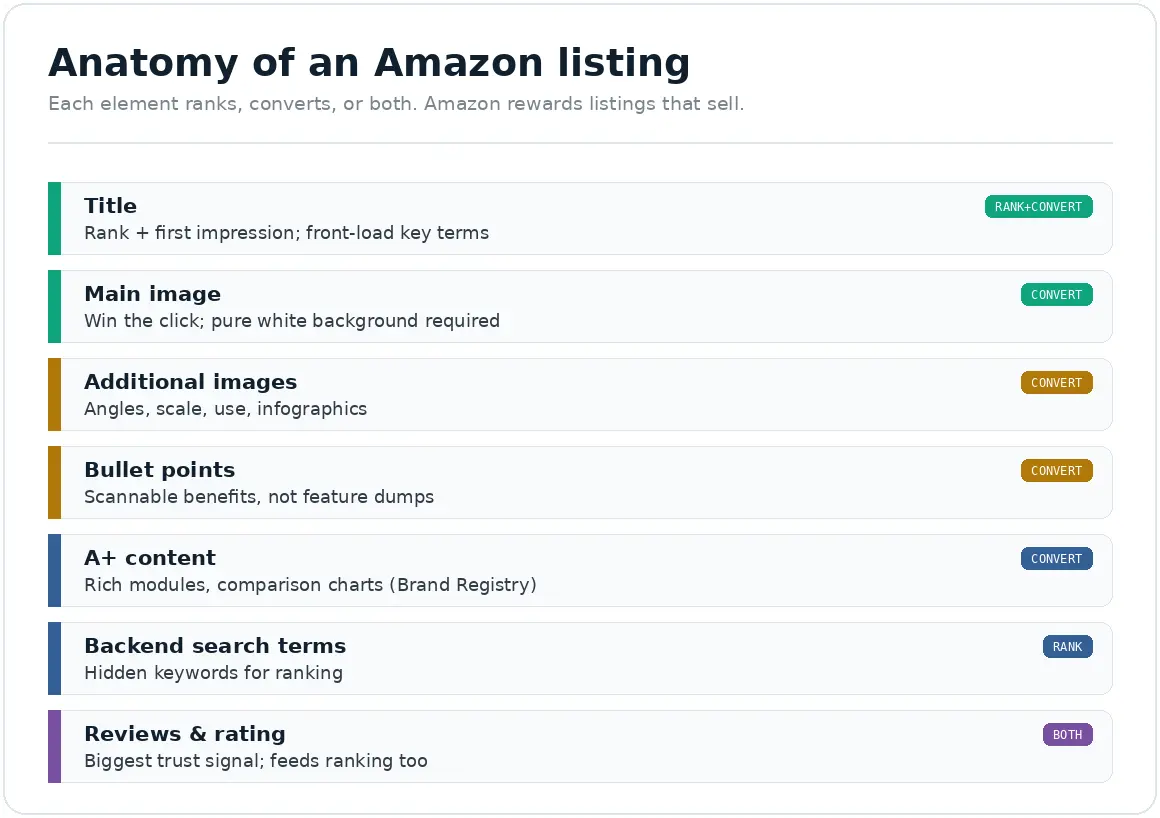
The core elements: title, images, bullet points, product description or A+ content, backend search terms, and reviews. Each has a specific job in ranking or converting, and most listings under-use several of them.
Here’s the core set and what each does:
Element
Its job
Common mistake
Title
Ranking + first impression; front-load key terms
Keyword-stuffed and unreadable, or missing key terms
Main image
Win the click in search results
Not pure white background, or low quality
Additional images
Convert: show use, scale, details, infographics
Too few; no lifestyle or infographic images
Bullet points
Convert: scannable benefits and key facts
Feature dumps instead of benefits; walls of text
A+ content
Convert: rich brand story and comparison modules
Not used at all (needs Brand Registry)
Backend search terms
Ranking: hidden keywords
Left blank or duplicating the title
Reviews and rating
Convert + rank: the biggest trust signal
Too few; not actively earned
Element roles reflect established Amazon listing practice; consistent across 2026 Amazon optimization guides.
Most listings do the title and main image passably and neglect the rest, which is exactly where the opportunity is.
- Amazon listing anatomy
How do I do keyword research for Amazon?
Find the terms shoppers actually search on Amazon (not Google), using Amazon’s own autocomplete and dedicated Amazon keyword tools, then place them in priority order: title first, then bullets, then backend search terms.
Amazon keyword research is its own discipline because Amazon is a shopping search engine, not a general one, people search it with high purchase intent and often different phrasing than they’d use on Google. Start with Amazon’s search autocomplete (type your product and see the suggestions), then use Amazon-specific keyword tools for volume and competition. Once you have your terms, place them by priority: the most important in the title, secondary terms across the bullets and description, and the remainder in the backend search-term fields (hidden keywords that help ranking without cluttering the visible listing). Don’t repeat terms already in your title in the backend, that’s wasted space. This mirrors the intent-first logic of keyword research for ecommerce product pages, applied to Amazon’s ecosystem.
Do images and A+ content really matter?
Yes, enormously. On Amazon, shoppers can’t touch the product, so images carry the conversion, and A+ content (for Brand Registered sellers) adds the rich, persuasive detail that plain listings lack. Both directly affect whether a click becomes a sale.
Images are the highest-leverage conversion element on an Amazon listing. The main image wins (or loses) the click in a crowded search results page, Amazon requires it on a pure white background, and it needs to be high quality and show the product clearly. The additional images then do the selling: multiple angles, the product in use, scale references, and infographics that call out key features and benefits (infographic-style images are especially effective because shoppers scan). A+ content, available to sellers enrolled in Amazon Brand Registry, replaces the plain description with rich modules, comparison charts, lifestyle imagery, and brand story, and can meaningfully lift conversion. Be wary of anyone quoting an exact “A+ content increases sales by X%” figure; those numbers vary widely and aren’t cleanly sourced, but the direction (richer, clearer listings convert better) is well established. Treat A+ content as a strong lever and measure your own result.
How do reviews affect Amazon listings?
Hugely, they’re the biggest trust signal and they feed ranking too. More genuine reviews and a solid rating lift both conversion and search visibility, because Amazon favors listings that convert, and shoppers trust products with real social proof.
Reviews do double duty on Amazon: they persuade shoppers (the same social-proof effect that works everywhere) and they indirectly help ranking, because a listing that converts better gets shown more. The practical challenge is earning them legitimately, Amazon has strict rules and harshly penalizes fake or incentivized reviews, so never buy or fabricate them. Use Amazon’s legitimate tools instead: the “Request a Review” button and enrollment in programs like Vine for new products. As with any store, aim for authentic reviews and a believable rating rather than a suspicious perfect score. This is the Amazon version of the trust-signal principle covered in product page trust signals.
How does the listing affect my Amazon ads?
Directly and expensively. Amazon ads send traffic to your listing, but the listing does the converting, so a poorly converting listing wastes ad spend no matter how well the campaign is managed. Fix the listing before you scale ads.
This is the point most sellers learn the hard way. You can run a perfectly managed Amazon PPC campaign, but if it sends clicks to a listing that doesn’t convert, you’re paying for traffic that doesn’t buy, and Amazon clicks are not cheap. Worse, poor conversion raises your effective cost per sale and can hurt the organic ranking that ads are supposed to support. So the listing is the foundation: get it converting first, then advertising amplifies a listing that already works instead of masking one that doesn’t. What that ad management itself costs is covered in how much does Amazon PPC management cost, and winning the all-important Buy Box is covered in how to win the Amazon Buy Box.
Should I sell on Amazon and my own store at the same time?
For most brands, yes, they serve different shoppers and reduce your dependence on any single channel. Amazon offers reach and built-in trust; your own store offers better margins, customer data, and brand control. The two work best together, not as an either/or.
The honest trade-off: Amazon gives you access to millions of high-intent shoppers and their trust in the Amazon checkout, but you pay for it in fees, fierce price competition, and not owning the customer relationship. Your own Shopify or WooCommerce store keeps the margin and the customer data, but you have to earn every visit. Running both spreads your risk and lets each channel do what it’s best at, and the listing and conversion discipline in this guide applies to both, just expressed differently on each platform. Managing that split well is part of multichannel ecommerce operations
How do I know if my listing is working?
Track your listing’s conversion rate (unit session percentage in Amazon’s reports), your organic ranking for target keywords, and your Buy Box win rate. Improving conversion is the signal that optimization is working, and it lifts everything else.
Amazon gives you the data in Seller Central. The key metric is unit session percentage (Amazon’s term for conversion rate, units divided by sessions), watch it by listing and over time. Also track where you rank organically for your priority keywords, and your Buy Box win rate (you can’t convert traffic you don’t hold the Buy Box for). Read these together: rising conversion usually lifts ranking, which lifts traffic, which, if the listing converts, compounds. This measure-diagnose-improve loop is the same discipline we bring to any channel, define the metric that matters, then move it, and on Amazon that metric is conversion.
We treat the listing as the foundation, get it converting before spending on ads.
Amazon is part of the multichannel operations we support, and we approach it the way we approach everything: find where the listing leaks (weak images, thin copy, missing A+ content, few reviews), fix the highest-impact elements first, and judge the result on unit session percentage and Buy Box share. Then, and only then, does scaling ads make sense.
It’s the same baseline-first discipline behind our conversion optimization work, where we fix the page a buyer actually lands on before spending anything on traffic to it. On Amazon, the listing is that buying path, and the ads that amplify it are our paid advertising work.
// we would rather show up in your reporting than in your inbox
Frequently asked questions
How do I optimize an Amazon product listing?
Make it rank and convert: a keyword-rich, readable title; a clean main image plus additional images and infographics; benefit-led bullet points; A+ content if you’re Brand Registered; backend search terms; and genuine reviews. Amazon rewards listings that convert, so optimizing for the shopper also helps ranking.
How is Amazon SEO different from Google SEO?
Amazon is a shopping search engine, so its algorithm favors listings that convert and sell, not just keyword relevance. Shoppers search Amazon with high purchase intent and different phrasing than Google. Research keywords using Amazon’s autocomplete and Amazon-specific tools, and optimize for sales, not just rankings.
Does A+ content increase sales?
It generally helps, richer, clearer listings convert better, and A+ content (for Brand Registered sellers) adds comparison charts, lifestyle imagery, and brand story that plain listings lack. Be cautious with exact “increases sales by X%” claims, as those vary widely and aren’t cleanly sourced. Use it and measure your own lift.
How do I get more reviews on Amazon?
Only through legitimate means, Amazon severely penalizes fake or incentivized reviews. Use the “Request a Review” button, enroll new products in Amazon Vine, and deliver a great product and experience. Aim for authentic reviews and a believable rating, not a suspicious perfect score.
Why isn't my Amazon listing converting?
Common causes: a poor main image that loses the click, too few or weak additional images, feature-dump bullets instead of benefits, no A+ content, too few reviews, or not holding the Buy Box. Check your unit session percentage in Seller Central, then fix the weakest element first.
Sources
Amazon prohibits fake/incentivized reviews; legitimate tools include Request a Review and Vine. Amazon Seller Central policy.
A+ content and image “uplift” percentages vary widely by source and are treated as directional here, not cited as precise figures.