Analytics / Tracking
Seven Signs Your Ecommerce Analytics Setup Is Broken
// if you can't trust the number, you can't act on it

By Fracto Solutions
September 9, 2026
The short answer
Your ecommerce analytics is probably broken if your GA4 revenue doesn’t match Shopify, your channels don’t add up to total sales, conversions look too low, or numbers changed after a checkout update. Most stores lose 10 to 30 percent of tracked revenue to these gaps. The fix starts with spotting which sign applies, then repairing the tracking underneath it.
10to30%
typical gap between GA4 and Shopify revenue
20%+
gap that usually signals a real config error
7
signs to check before you trust a report
Why does broken analytics matter so much?
Because every optimization decision depends on the data being right, and broken tracking quietly corrupts all of it. You can’t fix what you can’t measure, and worse, you’ll “fix” the wrong things.
Analytics is the foundation the rest of growth sits on. A CRO test needs trustworthy conversion data to call a winner. An ad budget decision needs accurate attribution to know which channel works. A funnel analysis needs correct event tracking to show where shoppers drop. When the underlying tracking is broken, each of those decisions is made on bad information, and the cost compounds: you scale a campaign that isn’t really working, kill one that is, or spend months chasing a checkout “problem” that’s actually just a tracking gap. That’s why confirming your data is trustworthy is always the first step in any serious conversion work, and it’s the first thing a good CRO audit checks.
- The 7 signs
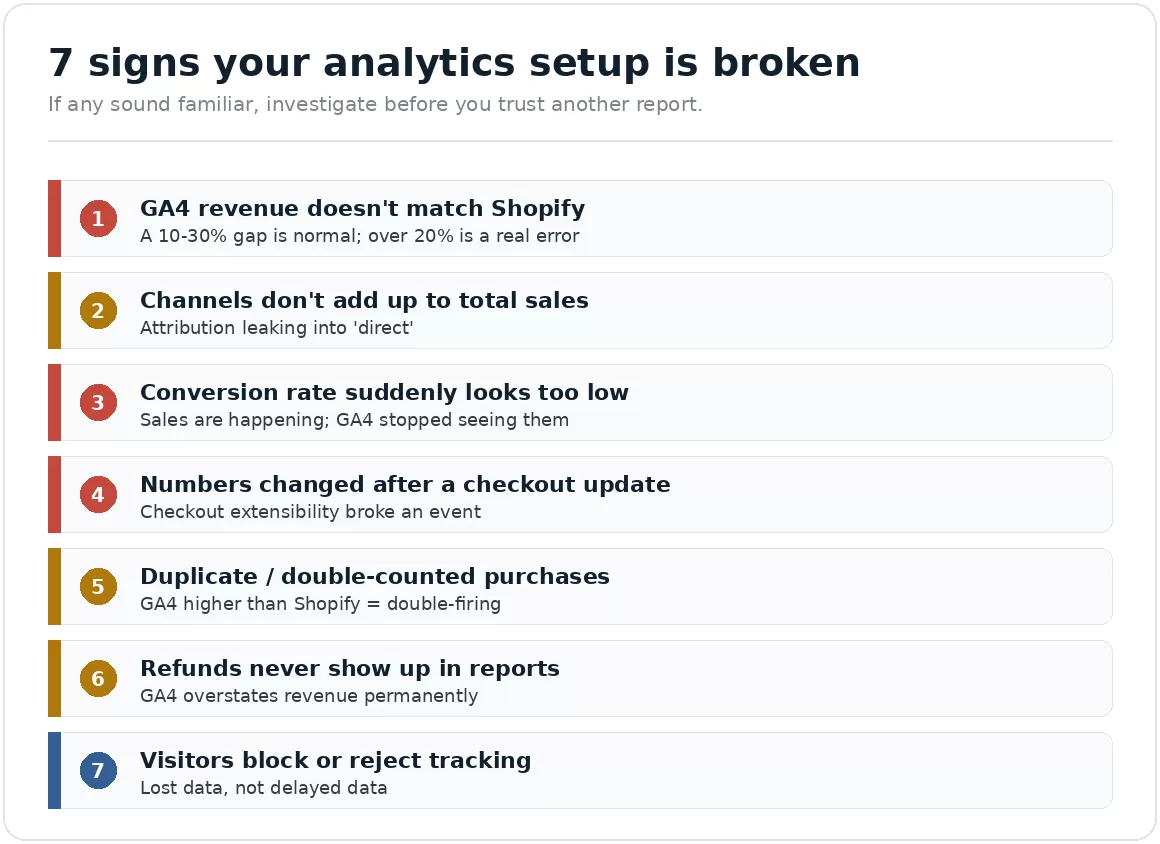
If any sign sounds familiar, investigate before you trust another report.
Why doesn't my GA4 revenue match Shopify? (Sign 1)
This is the most common sign, and a gap of 10 to 30 percent is typical because the two systems count differently. Where exactly the “normal” line falls varies by store and by source, so treat the range as a guide and compare against your own baseline over time.
Shopify records revenue from completed orders at the moment payment is captured, on its own servers. GA4 records revenue only when a purchase event successfully fires in the shopper’s browser. Those are two different measurements, so they never match exactly. Across multiple industry analyses, GA4 typically reports 10 to 30 percent less revenue than Shopify even when set up correctly. Published “normal” ranges vary a lot by source, so rather than trust a single threshold, watch your own gap over time: a stable gap in that band is expected, while a sudden jump points to a fixable technical problem such as misfiring events, blocked scripts, or a checkout-tracking gap. This sign has its own full breakdown, causes and fixes, in why GA4 revenue doesn’t match Shopify.
Why don't my marketing channels add up to total sales? (Sign 2)
If the revenue attributed across your marketing channels is far less than your actual total, a large chunk of sales is landing in “direct” or “unassigned”, which means your attribution is leaking.
When tracking breaks, sales that should be credited to a campaign lose their source and get dumped into “direct traffic” or go unattributed. A little of this is normal; a lot of it means you can’t tell which channels actually drive revenue. The usual causes are lost UTM parameters (stripped during redirects or app transitions), lost session identity (the shopper’s click ID not preserved through to purchase), and cross-device journeys (clicked an ad on mobile, bought on desktop). The practical damage is severe: your best-performing campaigns look weak because their sales got miscredited, so you cut budget from exactly the channels that work, which is why clean data underpins any paid advertising program. If “direct” is your biggest “channel,” that’s a red flag, not a win.
Why did my conversion rate suddenly drop? (Sign 3)
A conversion rate that dropped overnight, with no change to your store or traffic, is almost always a tracking failure, not a real collapse in sales. The sales are happening; GA4 just stopped seeing them.
Real conversion rates move gradually. A sudden, unexplained drop, especially right after a theme update, an app install, or a checkout change, points at tracking, not shopper behavior. What usually happened: the purchase event stopped firing correctly, so GA4 counts the sessions but misses the orders, dragging the measured conversion rate down (worth knowing your real conversion rate benchmarks so you can tell a tracking dip from a real one). Before you panic and start “fixing” a conversion problem that doesn’t exist, confirm the sales are actually down in Shopify (the source of truth for orders). If Shopify shows steady sales but GA4 shows a crash, you have a tracking break, not a conversion break. Diagnosing which is which is exactly what how to diagnose Shopify conversion issues walks through.
Why did my numbers change after a checkout or theme update? (Sign 4)
If your tracking numbers shifted right after a Shopify checkout update, theme change, or app install, the update likely broke an event. Checkout changes are one of the most common causes of sudden tracking gaps.
This one is especially important right now. Shopify moved checkout to a new “checkout extensibility” model and sunset the old checkout.liquid and additional scripts in 2025 (August 28, 2025 for Plus stores; August 26, 2026 for non-Plus), with Shopify Scripts following on June 30, 2026. Any tracking that relied on custom code in the old checkout, or on a tag firing when the thank-you page URL loaded, can silently break under the new system, because the data those tags expected now sits behind Shopify’s Web Pixels sandbox, a change our web development team handles during checkout migrations. The tag still “fires,” but the order data isn’t there. If your numbers changed around a checkout or theme update, that’s your prime suspect. The full explanation of what changed and how tracking works now is in Shopify Web Pixels vs Google Tag Manager.
Why is GA4 showing duplicate or double-counted purchases? (Sign 5)
If your transaction count or revenue in GA4 is higher than Shopify’s, you’re likely double-firing the purchase event, counting some orders twice, which inflates revenue and quietly corrupts your conversion rate.
Under-counting (GA4 lower than Shopify) is the common case, but over-counting happens too, and it’s more dangerous because it flatters you. The usual cause is the purchase event firing more than once: a pixel installed in two places, an app and a manual tag both tracking the same event, or a page that reloads and re-fires. The result is inflated revenue, an overstated conversion rate, and ad platforms optimizing toward phantom conversions. Because the numbers look good, this often goes unnoticed for months. A quick test order, watching how many purchase events fire, usually reveals it.
Why don't refunds show up in my analytics? (Sign 6)
If your GA4 revenue only ever goes up and never reflects refunds or returns, GA4 is permanently overstating what you actually earned, because refunds have to be sent to GA4 deliberately and most stores never set that up.
Shopify automatically deducts refunds from net revenue. GA4 does not, it only reflects a refund if you explicitly send a refund event to it. Most stores never configure this, so GA4 keeps counting refunded orders as revenue forever. On a store with meaningful returns (apparel, for example), this can be a large, permanent overstatement that makes every ROI and margin calculation wrong. If your reports show revenue climbing steadily with no dips for your known return rate, this is probably why.
How much data do ad blockers and consent cost me? (Sign 7)
If a meaningful portion of your traffic uses ad blockers, privacy browsers, or declines your cookie consent, GA4 never sees those sessions or their purchases, and that data is lost permanently, not delayed.
A growing share of shoppers block tracking, through ad blockers, privacy-focused browsers, or by declining consent banners. Every one of those shoppers still buys (Shopify records the order), but is invisible or incomplete in GA4. Depending on your audience, this alone can account for a significant slice of the gap between your platforms, and it’s structural: browser-only tracking will keep missing it. This is the main reason stores move to server-side tracking, which captures events from the server rather than relying entirely on the shopper’s browser. It narrows the gap (it never fully closes it), at the cost of more setup and consent complexity.
How do I know which sign is my real problem?
Start from the source of truth and work backward. Shopify’s order data is correct by definition (it’s the money you actually received), so compare everything against it, and place a test order to watch what your tracking does in real time.
The diagnostic method is straightforward:
Trust Shopify for orders and revenue. It records every paid order without depending on browser conditions, so it’s your baseline.
Compare GA4 against Shopify for a clean date range (matching time zones). Note whether GA4 is lower (under-counting, Signs 1-4, 7) or higher (over-counting, Sign 5).
Place a test order and watch how many purchase events fire, and whether they carry the right revenue. This catches misfires and duplicates fast.
Check your channel totals against your real total to gauge attribution loss (Sign 2).
Check whether refunds are configured to reach GA4 (Sign 6).
Once you know which sign is yours, the fix is specific rather than a vague “our analytics is off.” Getting this right is the foundation of every other growth decision, which is why analytics and tracking is a distinct Fracto service.
- The 7 signs
S.No.
sign
Triggers when
Job
1
Someone joins your list
10-30% gap normal; over 20% a real error
GA4 low
2
Channels don't add up to total sales
Attribution leaking into "direct"
GA4 low
3
Conversion rate suddenly looks too low
Sales happening; GA4 stopped seeing them
GA4 low
4
Numbers changed after a checkout update
Checkout extensibility broke an event
GA4 low
5
Duplicate / double-counted purchases
Purchase event firing more than once
GA4 high
6
Refunds never show up in reports
Refund events never sent to GA4
GA4 high
7
Visitors block or reject tracking
Ad blockers, privacy browsers, declined consent
GA4 low
Source: GA4-vs-Shopify reconciliation analyses (2025 to 2026); Shopify checkout extensibility documentation. Gap figures corroborated across multiple independent sources.
We treat trustworthy data as step one, because every other decision depends on it.
Before we run a single test or touch a campaign, we confirm your tracking reflects reality: we reconcile GA4 against Shopify, place test orders to catch misfires and duplicates, check attribution and refund handling, and fix what’s broken underneath. Only then is the data safe to act on. It’s the least glamorous part of conversion work and the most important, because optimizing on broken data just moves you confidently in the wrong direction.
Frequently asked questions
How much should GA4 and Shopify revenue differ?
A gap of roughly 10 to 30 percent is commonly reported as normal, caused by standard browser limitations, consent, and processing timing, though sources differ on exactly where “normal” ends. Rather than rely on a single cutoff, track your own gap: a stable gap is expected, while a sudden jump is what signals a fixable problem.
Which should I trust, GA4 or Shopify?
Shopify for the money you actually earned, it records every paid order on its own servers. GA4 for behavior and channel patterns. Don’t ask either tool to be both. Reconcile them, but treat Shopify as the source of truth for revenue.
Can broken tracking make my conversion rate look wrong?
Yes, in both directions. Missing purchase events make your conversion rate look too low; double-counted purchases make it look too high. Either way, decisions based on that rate will be wrong, which is why verifying tracking comes before any CRO work.
Does server-side tracking fix everything?
No. It captures events the browser misses (from ad blockers, consent, misfires), so it narrows the gap and improves accuracy. But it doesn’t fully close the gap, and it adds setup and consent complexity. It’s an improvement, not a magic fix.
How often should I check my analytics setup?
At minimum after any checkout change, theme update, or app install, since those are the most common causes of sudden breaks. Beyond that, a periodic reconciliation of GA4 against Shopify catches slow drift before it corrupts months of decisions.
Keep reading
Sources
Every statistic is traced to its original publisher and dated. The GA4-vs-Shopify gap is corroborated across multiple independent 2025 to 2026 analyses; the Shopify checkout changes are from Shopify’s own documentation and migration guides. Figures that could not be traced to a primary source were left out.
GA4 vs Shopify revenue gap of 10 to 30 percent is widely reported as normal across multiple 2025 to 2026 analyses; note that sources differ on exact sub-thresholds, so no single “normal vs error” cutoff is treated as authoritative here. https://weltpixel.com/blogs/news/shopify-analytics-vs-ga4-why-revenue-numbers-never-match ; https://gropulse.com/why-your-ga4-purchases-dont-match-shopify/
GA4 data-driven attribution default since November 2023; refunds require an explicit refund event; currency/timezone/counting-method differences are structural. (Same sources.)
Shopify checkout extensibility: checkout.liquid and additional scripts sunset for Thank you/Order status pages August 28, 2025 (Plus) and August 26, 2026 (non-Plus); Shopify Scripts sunset June 30, 2026; Web Pixels API is the supported tracking method; GTM containers incompatible with the new sandbox. https://revize.app/blog/shopify-checkout-extensibility-migration-guide ; Shopify Customer Events documentation.