Analytics / Tracking
Why GA4 Revenue Does Not Match Shopify (and How to Fix It)
// two tools, two numbers, on purpose

By Fracto Solutions
September 9, 2026
The short answer
GA4 revenue rarely matches Shopify because they count different things: Shopify records paid orders on its servers; GA4 records browser purchase events. Browser tracking misses some sales, so GA4 typically reports 10 to 30 percent less. That range is normal; track your own gap over time rather than trusting a single cutoff.
10to30%
how much less GA4 usually reports vs Shopify
30%+
top of the normal range
your own
trend is the real signal, not a fixed cutoff
“Why doesn’t my GA4 revenue match Shopify?” is one of the most common questions ecommerce teams ask. The short version: they were never designed to match, they measure different things. But knowing which part of the gap is normal and which part is a real problem is what lets you trust your data again. This article breaks down the causes and fixes. It’s the deep-dive on one sign from seven signs your analytics setup is broken. It’s part of our analytics and tracking service.
Why don't GA4 and Shopify revenue match?
Because they count two different things at two different moments. Shopify records revenue from completed orders when payment is captured, on its own servers. GA4 records revenue only when a purchase event fires in the customer’s browser.
That difference is the root of everything else. Shopify has the order the instant the payment goes through, it doesn’t depend on anything happening in the shopper’s browser afterward. GA4, by contrast, only knows about a sale if the purchase event successfully fires and reaches Google’s servers, which depends entirely on the shopper’s device, browser, connection, and consent choices at that moment. Because browser tracking inevitably misses some events, GA4 almost always reports the lower number. Across multiple industry analyses, that gap runs 10 to 30 percent even on correctly configured stores.
How much of a gap is normal?
A gap in the 10 to 30 percent range is widely reported as normal, partly depending on your audience. Sources disagree on where “normal” ends, so no single cutoff is authoritative; watch your own trend, a stable gap is expected, a sudden jump points to a fixable error.
Use these bands as a rough guide, since the “normal” gap depends on how much of your traffic blocks tracking:
What to compare
What it tells you
Your gap vs the 10 to 30 percent range
Inside it is expected; well outside warrants a look.
Your gap this month vs last
A stable gap is normal; a sudden jump signals a problem.
Gap right after a checkout or theme change
A new jump points to a tracking break from that change.
Source: compiled from multiple 2025 to 2026 GA4/Shopify reconciliation analyses.
The bands stop two mistakes: panicking over a normal gap, and ignoring a large one that’s quietly wrecking your decisions. If you’re in the top band, something specific is broken, and the rest of this article is where to look.
- Which gap is normal
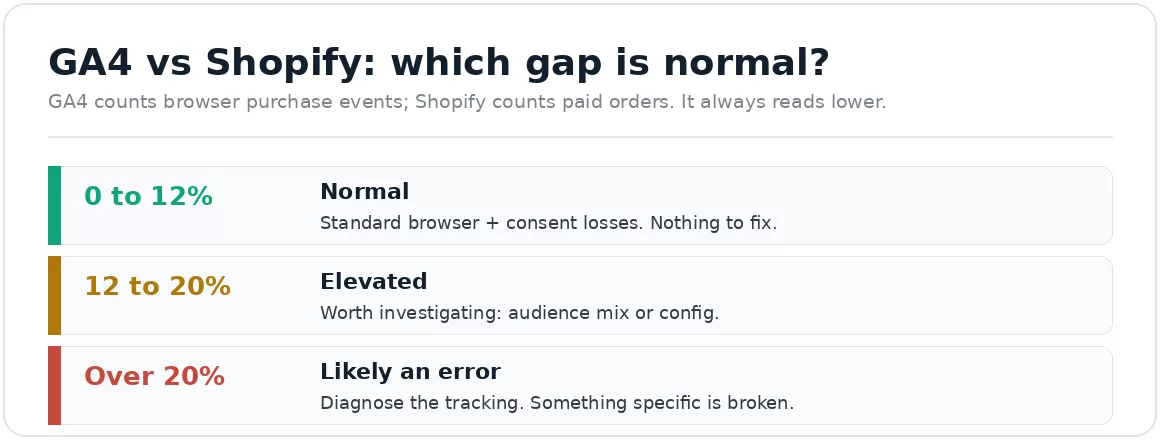
GA4 always reads lower because it counts browser events, not paid orders.
What causes the gap? (the main reasons)
Several structural and technical causes stack up. The biggest are browser tracking losses, attribution and identity gaps, and differences in what each system counts.
The thank-you page event misfires. If the purchase event fires late, twice, or not at all (JavaScript timing, a shopper closing the tab, a checkout conflict), GA4 misses or miscounts the sale. This is the single highest-impact cause.
Ad blockers and declined consent. Shoppers using ad blockers, privacy browsers, or who decline your cookie banner still buy (Shopify sees it) but are invisible or partial in GA4.
Cross-device journeys. A shopper clicks an ad on mobile and buys later on desktop; GA4 can lose the link, Shopify records the order regardless.
Counting method. Shopify counts orders at payment capture; GA4 counts sessions where a purchase fired. Different entities, different moments.
Timezone mismatch. If your Shopify and GA4 time zones differ, orders shift across date boundaries, creating daily gaps that mostly cancel out over longer windows.
Currency handling. If you sell in multiple currencies, Shopify reports in your base currency while GA4 may record whatever currency the event passed, with no automatic conversion.
Why does GA4 sometimes overstate revenue?
Usually because of refunds and duplicate events. Shopify deducts refunds automatically; GA4 only reflects them if you explicitly send a refund event, so GA4 can permanently overstate what you kept.
Two causes push GA4 higher instead of lower. First, refunds: Shopify adjusts net revenue for returns automatically, but GA4 keeps counting a refunded order as revenue unless you deliberately send it a refund event, which most stores never set up. On a store with meaningful returns, that’s a permanent overstatement. Second, duplicate purchase events: if the purchase fires twice (a pixel installed in two places, an app plus a manual tag, a reloading confirmation page), GA4 double-counts. Because overstated revenue flatters your numbers, both often go unnoticed for months.
How does the gap hurt my decisions?
It distorts the two things you use analytics for: judging campaigns and judging your funnel. Miscredited or missing sales make good campaigns look bad and can make your conversion rate look broken when it isn’t.
Under-reported attribution makes your paid advertising campaigns look like they’re failing, because GA4 isn’t seeing the final purchase, so you cut budget from channels that actually work. Inaccurate funnel data makes your checkout-to-purchase rate look low, so you go hunting for a conversion problem that doesn’t exist while the real issue is tracking. And overstated revenue (from refunds or duplicates) makes you think campaigns are more profitable than they are. In every case, you’re deciding confidently on a wrong number, which is worse than having none.
How do I narrow the gap?
Fix the specific causes: make sure the purchase event fires reliably, send refund events to GA4, remove duplicate tags, align time zones and currency, and consider server-side tracking for the browser losses you can’t fix client-side.
A practical order of operations:
Confirm the purchase event fires once, reliably. Place a test order and watch. This catches the biggest cause (misfires) and duplicates at the same time.
Send refunds to GA4 so it stops overstating net revenue.
Align time zones between Shopify and GA4, and check currency handling if you sell internationally.
Preserve attribution by making sure UTMs and click IDs survive the journey to purchase.
Add server-side tracking to recover events lost to ad blockers, consent, and browser limits. It narrows the gap meaningfully, though it never fully closes it and adds consent complexity.
Can GA4 and Shopify ever match exactly?
No, and they’re not supposed to. The realistic goal is to get the gap into the normal range and understand what remains, then use each tool for what it’s good at.
Forcing a perfect match is a waste of effort; structural differences (counting method, browser dependency, timing) guarantee some gap forever. The right goal is to eliminate fixable errors so the remaining gap is small and explainable, then use Shopify as your source of truth for revenue and GA4 for behavior. Don’t ask either tool to be the other. Once the gap is in the normal band and you know why, your data is trustworthy enough to act on.
We reconcile your data before we trust it, then fix the specific gaps.
We compare GA4 against Shopify for a clean window, place test orders to catch misfires and duplicates, check refund and attribution handling, and add server-side tracking where browser losses are large. The goal is a small, explainable gap you can act on, not a perfect match that no store achieves.
It’s the same baseline-first discipline behind our conversion work: get the data trustworthy first, because every decision after it depends on the number being real.
Frequently asked questions
Is it normal for GA4 to show less revenue than Shopify?
Yes. GA4 almost always shows less because it depends on browser events that sometimes fail, while Shopify records every paid order directly. A gap in the 10 to 30 percent range is normal; the concern is a sudden change in your own gap, not a fixed cutoff.
Which number is correct, GA4 or Shopify?
Shopify, for actual revenue, it records the money you received. GA4’s revenue is an observed subset limited by browser tracking. Use Shopify as the source of truth for sales and GA4 for understanding behavior and channels.
Why is my GA4 revenue higher than Shopify?
Usually duplicate purchase events (the purchase firing more than once) or unrecorded refunds (GA4 keeps counting refunded orders unless you send it refund events). Both inflate GA4. A test order and refund-event check will confirm it.
Does server-side tracking make them match?
It narrows the gap by capturing events the browser misses, but it doesn’t make them match exactly and it doesn’t remove structural differences like counting method or refund handling. It’s an accuracy improvement, not a guarantee of parity.
Sources
Every statistic is traced to its original publisher and dated. The GA4-vs-Shopify gap is corroborated across multiple independent 2025 to 2026 analyses; the Shopify checkout changes are from Shopify’s own documentation and migration guides. Figures that could not be traced to a primary source were left out.
GA4 typically reports 10 to 30 percent less revenue than Shopify, corroborated across multiple 2025 to 2026 analyses; sources differ on exact sub-thresholds, so no single “normal vs error” cutoff is treated as authoritative here. https://gropulse.com/why-your-ga4-purchases-dont-match-shopify/ ; https://weltpixel.com/blogs/news/shopify-analytics-vs-ga4-why-revenue-numbers-never-match ; https://www.bloomanalytics.io/blog/shopify-google-analytics-revenue-discrepancy
Counting method (orders at payment capture vs browser purchase events), refunds requiring an explicit event, GA4 data-driven attribution default since November 2023, timezone and currency differences: same sources.