Paid / Google Shopping
Google Shopping Feed Optimization: What Actually Moves Sales
// the feed is the campaign; everything else bids on top of it

By Fracto Solutions
September 28, 2026
The short answer
Google Shopping feed optimization means improving your product data, titles, images, attributes, and categories, so Google shows your products for the right searches at a lower cost. The feed is the foundation: it decides what you rank for and your click quality. Even Performance Max relies on it, a messy feed means Google’s automation just spends against it.
Feed
~150
Hybrid
Why is the product feed so important?
Because Google uses your feed, not keywords you pick, to match your products to searches. The feed’s quality determines what you show up for, how relevant you look, your click-through, and your cost per click. It’s the single biggest lever in Google Shopping.
Unlike search text ads, where you bid on keywords, Shopping is feed-driven: Google reads your product data (titles, attributes, images) and decides which queries to match you to. That makes the feed your targeting, your relevance signal, and your quality score all at once. A weak feed produces low impressions, poor query matching, and higher costs; a strong feed expands your reach and lowers your cost per click for the same budget. This is also why automation can’t rescue bad data: as every 2026 source puts it, if the catalogue is messy, Performance Max doesn’t fix it, it spends against it. The feed is the foundation everything else, including Google’s AI, builds on.
What makes a good Shopping product title?
A title that front-loads the terms shoppers actually search: brand, product type, and key attributes (size, color, material), within roughly 150 characters. Google weighs titles heavily for matching, so a descriptive, keyword-rich title outperforms a short or vague one.
The title is the highest-impact feed element because Google leans on it to understand and match your product. The pattern that consistently performs: lead with the most important terms and include brand, product type, and the attributes shoppers search by. Compare “Blue Shirt” against “Levi’s Men’s Slim-Fit Denim Shirt, Blue, Medium”, the second matches far more real searches and reads clearly in the results. Use the space (around 150 characters is the practical maximum) but front-load the important terms, since the start of the title carries the most weight and is what shows before truncation. Write for the shopper’s search language, not internal SKU names. This mirrors the intent-first logic of keyword research for ecommerce product pages, applied to feed titles.
What are the other key feed elements?
Beyond titles: high-quality images (white background, multiple views), complete and accurate attributes (GTIN, brand, product type, Google category), competitive pricing, and custom labels for segmentation. Each affects either what you match for or whether the click converts.
Here’s the core feed checklist and what each element does:
Feed element
Its job
Common mistake
Title
Query matching (highest weight)
Short, vague, or SKU-style
Product image
Win the click; meet Google's requirements
Not white-background, low quality
GTIN / brand
Helps Google identify and match the product
Missing or wrong identifiers
Product type & Google category
Accurate classification and matching
Left blank or miscategorized
Description
Secondary matching and detail
Thin or copied manufacturer text
Price
Matching and price-competitiveness
Uncompetitive without knowing it
Custom labels
Segment products for bidding
Not used, so no bidding control
Feed element roles are consistent across 2026 Google Shopping guides; complete, accurate data expands matching and lowers cost.
The theme: completeness and accuracy. Missing GTINs, blank product types, and poor categorization all limit how well Google can match and rank you.
- The Shopping feed
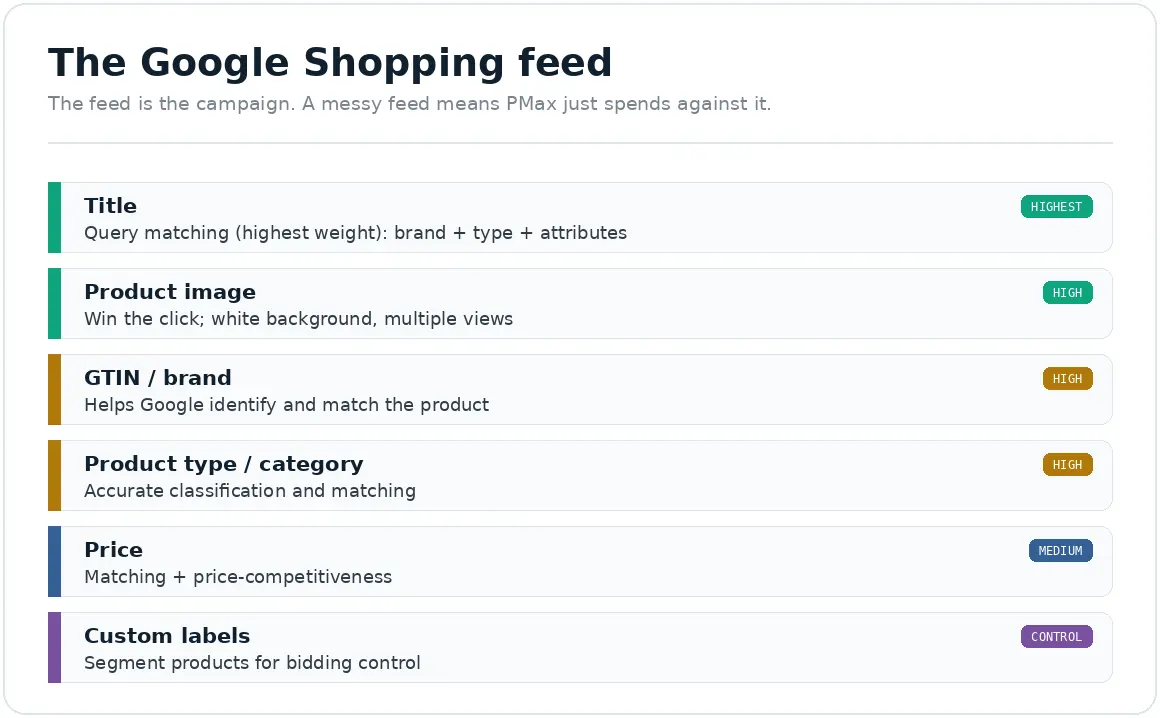
The feed is the campaign. A messy feed means PMax just spends against it.
How do I fix feed problems at scale?
Use Merchant Center feed rules and supplemental feeds to transform and patch data across your whole catalogue from one place, rather than editing products one by one. This is how you optimize hundreds or thousands of SKUs without touching your source system.
Editing products individually doesn’t scale and invites errors. Two tools do the heavy lifting. Merchant Center feed rules let you transform attribute values in bulk (for example, restructuring every title to the brand-plus-type-plus-attribute pattern) without changing your store’s back end. Supplemental feeds let you patch missing data, GTINs, brand names, product types, across the catalogue from a single spreadsheet that layers on top of your main feed. Together they let you raise feed quality catalogue-wide efficiently. One caution on AI feed tools: they can speed this up, but only if they lock identifiers (brand, GTIN, model, size, color) and let you review changes, generic AI applied blindly will invent spec values and corrupt your feed. Optimize at scale, but keep a human check on accuracy, the same accuracy discipline that protects trust everywhere.
Performance Max or Standard Shopping, which should I run?
It’s not either/or in 2026, the best practice is a hybrid: Standard Shopping for control over top and high-margin products, Performance Max for scale and discovery across Google’s full inventory. Both depend on a strong feed. PMax needs enough conversion volume (commonly cited around 30 to 50 a month minimum) to optimize well.
The two campaign types trade off automation against control. Performance Max hands Google’s AI your feed and assets and runs across Search, Shopping, YouTube, Display, Gmail, and Discover for maximum reach with minimal manual work. Standard Shopping keeps you in control of bidding, query-level negative keywords, and granular reporting. In 2026, most successful stores don’t choose, they run both deliberately: Standard on the SKUs where control and margin matter most, PMax layered on top for scale and to reach placements Standard can’t. Google reports that advertisers who shifted from Standard Shopping to Performance Max drove a 25% increase in conversion value on average, at a similar ROAS rather than at the same budget. That distinction matters: a similar ROAS on higher spend also produces more conversion value, so this is a weaker claim than it is usually quoted as. It is also a blended figure worth examining, since much of it can be brand traffic absorbed into PMax. The honest rule: PMax amplifies a good structure and feed; it doesn’t create one. The full comparison is in Performance Max vs Standard Shopping.
How do I structure and bid on Shopping campaigns?
Segment rather than lumping everything into one campaign: split by category, brand, or margin using custom labels, add negative keywords (in Standard), and move to Target ROAS bidding once you have enough conversion data. Start simpler, then add control as data accumulates.
Structure is where feed quality turns into profit. Avoid one giant catch-all campaign, segment your products (by category, brand, or profit margin via custom labels) so you can bid differently on your best and worst performers. In Standard Shopping, use negative keywords to cut wasted spend on irrelevant queries. On bidding, a common progression: start new campaigns on a simpler strategy to gather data, then switch to Target ROAS once you have enough conversions, so bidding optimizes for profitability rather than raw traffic, and set that ROAS target from your break-even (covered in what is a good ROAS for ecommerce). Good structure plus a good feed is what lets both manual and automated bidding make smart decisions.
How do I know if my feed optimization is working?
Track impression share and click-through (are more of the right people seeing and clicking your products?), cost per click, and ultimately ROAS and conversion, against your break-even. Feed improvements should show up as broader, cheaper, better-matched traffic that converts.
Google Merchant Center and Ads give you the signals. Watch impression share and benchmark CTR and CPC to see whether feed changes are improving matching and click quality (better feeds typically expand impressions and lower CPC). Then judge the outcome on ROAS and conversion against your break-even, because cheaper clicks only matter if they convert profitably. Merchant Center also flags feed quality issues and “click potential,” fix those first. The measure-improve loop is the same discipline we bring to any channel: change the feed, watch the metrics, keep what works, and always judge against profit, not vanity impressions.
We fix the feed first, structure the campaigns deliberately, and judge everything on profit.
Because feed quality drives everything downstream, we start there, complete, accurate, keyword-rich product data, fixed at scale with feed rules and supplemental feeds, before touching bids. Then we structure Standard and Performance Max as a coordinated system, set ROAS targets from your real break-even, and measure on blended, honestly-attributed results.
It’s the same measurement-first discipline behind our paid advertising and conversion optimization work, because even perfect Shopping traffic still needs a page that converts.
// we would rather show up in your reporting than in your inbox
Frequently asked questions
What is Google Shopping feed optimization?
It’s improving your product data, titles, images, attributes, categories, and pricing, so Google shows your products for the right searches at a lower cost and higher conversion. Because Shopping is feed-driven (not keyword-driven), the feed is the single biggest lever over what you rank for and what you pay.
What makes a good Shopping product title?
One that front-loads the terms shoppers search: brand, product type, and key attributes (size, color, material), within roughly 150 characters. Google weighs titles heavily for matching, so “Levi’s Men’s Slim-Fit Denim Shirt, Blue, Medium” beats “Blue Shirt.” Write in the shopper’s search language, not SKU names.
Should I use Performance Max or Standard Shopping?
In 2026, both, as a hybrid. Use Standard Shopping for control over top and high-margin products, and Performance Max for scale and discovery across Google’s full inventory. Both depend on a strong feed, and PMax needs enough conversion volume (commonly ~30 to 50 a month) to optimize well.
Does the feed matter for Performance Max?
Enormously. Even though PMax is automated, it uses your Merchant Center feed as its foundation, so a messy feed means PMax spends against bad data instead of fixing it. Feed quality shapes matching, cost, and results for both PMax and Standard Shopping. Optimize the feed first.
How do I optimize a large product feed?
Use Merchant Center feed rules to transform attributes in bulk and supplemental feeds to patch missing data (GTINs, brands, product types) across the whole catalogue from one spreadsheet. This scales optimization without editing products individually. If using AI tools, lock identifiers and review changes to avoid corrupted data.
Sources
Feed is the foundation of Google Shopping (PMax and Standard both depend on it; “if the catalogue is messy, PMax spends against it”); feed essentials (keyword-rich titles ~150 chars, white-background images, complete attributes, custom labels, feed rules, supplemental feeds); hybrid PMax + Standard best practice; PMax needs ~30 to 50 conversions/month: consistent across multiple 2026 Google Shopping guides. WebAppick guide: google shopping feed optimization ; Grumspot guide: google shopping optimization ; AdNabu guide: performance max vs standard shopping
The 25% figure: Google states that advertisers who shifted from Standard Shopping to Performance Max “drove a 25% increase in conversion value, on average, at a similar ROAS” (Google, Retailer best practices for Performance Max). We corrected an earlier draft that rendered this as “at the same budget”; Google says similar ROAS, which is a materially weaker claim. It is a blended figure and brand traffic absorbed into PMax flatters it, so run your own experiment before acting on it. LionelZ guide: shopping campaign structure google ads 2026