International / Setup
Shopify Markets and Multi-Currency: A Setup Guide
// one store, many currencies and languages

By Fracto Solutions
October 7, 2026
The short answer
Shopify Markets is the built-in feature, free on every plan, that lets one store sell internationally with local currency, language, pricing, and domains per market. Enable multi-currency through Shopify Payments so shoppers pay in their own currency, then configure each market’s currency, pricing, and localization from Settings, Markets.
Free
1.5 to 2%
0.5%
What is Shopify Markets?
Shopify Markets is a built-in feature that lets a single store sell to multiple countries with localized currency, language, pricing, domains, payment methods, and duty and tax handling, each configured per market from one backend. You don’t need separate stores. Creating markets is free on every plan, Starter included, but “free” means no subscription, not no cost: the fees arrive on currency conversion and duty collection, and they are covered below.
International selling on Shopify used to mean clunky workarounds or a separate store per country. Now you define “markets,” a country or a region grouping several, and configure each one’s currency, translated content, local pricing, domain, payment methods, and tax and duty handling from a single admin and a single catalog. Creating markets is free on every plan, Starter included, with no separate subscription. Two limits to know before you plan: customizing themes and checkout pages per market needs Advanced or higher, and customizing checkout page blocks across the information, shipping and payment steps, plus business-entity settings, is Plus only. Below that you still get market-level catalogs, currencies, domains, languages, discounts, and taxes. The paid tier, Managed Markets, adds merchant-of-record duty collection and compliance, covered below, though its eligibility is narrower than most write-ups admit.
How do I set up multi-currency?
Enable Shopify Payments or Adyen, then in Settings, Markets, assign each market its local currency. Shoppers then see and pay in their own currency, with conversion handled automatically, while you’re paid in your home currency. Check this first: without one of those two processors, every market pays in your store’s default currency and local pricing is off the table.
Multi-currency is the highest-impact quick win in international selling, because shopping in a foreign currency is a real conversion barrier. The setup:
Enable Shopify Payments or Adyen. Shopify is explicit that processing payments in multiple currencies requires one of these two: “If you use a different payment processor, then customers in all markets pay in your store’s default currency.” This is a hard gate, not a recommendation, and Shopify Payments is not available in every country, so confirm your own before planning a multi-currency build.
Budget for the conversion fee, which is the cost most setup guides leave out. It is 1.5% per transaction for stores in the United States and 2% in every other Shopify Payments region, and it is charged whether you use automatic exchange rates or set them manually. On automatic rates it is built into the price the customer sees; on manual rates it comes out of your payout. PayPal wallet conversions are charged separately at 3%.
Go to Settings, then Markets, add or open a market, and assign its local currency (for example, EUR for a European market).
Repeat per market, so each region gets its appropriate currency.
Once set, shoppers see and pay in their own currency, Shopify handles conversion, and you receive funds in your home currency. Price the conversion fee in deliberately rather than discovering it in your payouts: at 1.5% to 2% of every international transaction it is a larger and more universal cost than the duty fee, and on automatic rates your customers already pay it inside the price they see.
What is local pricing, and why does it matter?
Local pricing means setting deliberate prices per market, not just auto-converting your home price. It lets you match local purchasing power, hit psychological price points (like round numbers), and protect margin against currency swings, rather than showing awkward converted figures.
Auto-conversion takes your home price and converts it, producing figures like “EUR 43.17” that look odd and ignore local conditions. Local pricing lets you set intentional prices per market instead: a clean “EUR 45,” priced for that market’s purchasing power. Shopify Markets supports market-specific pricing as fixed prices or percentage adjustments, which lets you:
Hit psychological price points (round, clean numbers) in each currency.
Match local purchasing power and competition rather than exporting home-market prices.
Protect margin against exchange-rate movement, so a currency dip doesn’t quietly erode your profit.
For serious international selling we set local prices rather than relying on raw conversion. That is our position from client work, not a published finding: we have not found a primary study that isolates local pricing from everything else that changes when a store is properly localized. What we can say is that it takes more setup, makes each market feel purpose-built, and stops exchange-rate movement quietly eroding margin.
Should I use local domains or subfolders?
Either helps, and both beat serving everything on one generic domain. A local domain (yourbrand.fr) or subfolder (yourbrand.com/fr) builds trust with local shoppers and helps international SEO, with hreflang tags telling search engines which version to show which region.
URL structure is a trust and SEO signal. Shopify Markets supports two approaches: country-code domains (yourbrand.fr), which give the strongest local signal but mean managing several domains, or subfolders (yourbrand.com/fr), which are simpler and consolidate SEO authority. Subfolders are the lower-maintenance default for most brands. Either way Markets generates hreflang tags automatically, telling search engines which localized version to show which country’s searchers and keeping the wrong-language page out of the wrong market. This is ecommerce SEO, applied internationally.
Feature
Standard Markets (free)
Managed Markets (formerly Markets Pro)
Multi-currency + language
Yes
Yes
Local pricing + domains
Yes
Yes
Duties at checkout
Optional, 0.5% per transaction today (0.85% / 1.5% regular)
Managed DDP, no separate duty fee
Compliance
You manage
Managed (Global-e as merchant of record)
Currency conversion fee
1.5% US stores, 2% all other regions
1.5%, included in buyer price
Service fee
None for Markets itself
3.5% per transaction, 3.25% on Plus
Who can use it
Any plan, including Starter
Business based in US, Canada or UK, and Shopify Payments required
Best for
Testing / simpler setups
Scaling cross-border, if eligible
Fees verified against Shopify’s international pricing page and Help Center, October 2026. Shopify revised the Managed Markets fee schedule in October 2025, so older write-ups may still quote 6.5% and 2.5%.
When is Managed Markets worth the extra cost?
Managed Markets is worth it when you want fully managed DDP duty collection, managed compliance with Global-e as merchant of record, and local payment infrastructure without building it yourself, and it costs 3.5% per transaction, or 3.25% on Plus. Check eligibility first: it requires a business based in the US, Canada or the UK, and Shopify Payments. For everyone else the question is settled, and standard Markets is the answer.
Shopify offers two tiers, and choosing is about how much complexity you want to hand off:
Standard Markets (free): handles multi-currency, multi-language, local pricing and domains, regional shipping and payments, and duty and tax estimation. You can also collect duties at checkout, which costs 0.5% per transaction, a temporary reduction in place since 2 February 2025 that applies whatever payment provider you use and for which Shopify has published no end date; the regular rate behind it is 0.85% with Shopify Payments and 1.5% without. The fee applies to every order with duties calculated at checkout even when the duty comes to zero, and never to domestic orders, EU-to-EU orders, or abandoned checkouts. It has been available on all plans since February 2025, having previously been Advanced and Plus only. You manage your own tax registration, duty remittance, and compliance.
Managed Markets (formerly Markets Pro): a fully managed, merchant-of-record service where Global-e handles tax remittance and compliance, adding managed DDP duty collection and more local payment methods. It costs 3.5% per transaction, or 3.25% on Shopify Plus, with no separate duty-calculation fee on top, plus the 1.5% currency conversion fee built into the buyer’s price. Managed international pricing raises international prices to cover the fee, so your net payout is close to a domestic order. Eligibility is the catch: your business must be based in the US, Canada or the UK, and the store must use Shopify Payments. Canada and the UK became generally available in July 2026.
If you are eligible, it comes down to scale. Testing a couple of markets and able to handle your own tax setup, standard Markets keeps costs down. Scaling cross-border, Managed Markets can earn its 3.5% through reduced risk, and that fee is worth comparing against what a tax adviser and your own team’s time cost. One thing shifted the maths in 2026: with the EU’s EUR 150 customs duty relief gone and the US $800 exemption suspended, far more orders now need duty calculated and remitted correctly, so handing it off is worth more than it was.
- Shopify Markets: free vs Pro
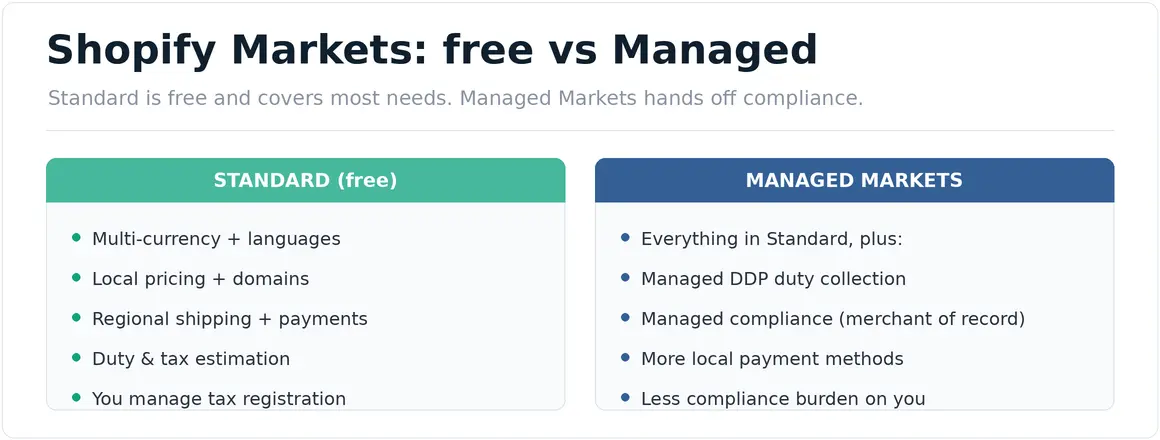
Standard is free and covers most needs. Pro hands off compliance.
We set up Shopify Markets so each country feels local, then choose the right tier.
We enable multi-currency, set deliberate local pricing (not just raw conversion), configure local domains with hreflang, and pick standard vs Managed Markets based on your scale and how much compliance you want handled for you.
It’s part of our ecommerce operations work, and because localization is a conversion lever, it connects to our conversion optimization work.
// we would rather show up in your reporting than in your inbox
Frequently asked questions
Is Shopify Markets free?
Standard Shopify Markets is free on every Shopify plan, Starter included, and it handles multi-currency, multi-language, local pricing and domains, regional shipping and payments, and duty and tax estimation. Two costs sit on top: a currency conversion fee of 1.5% per transaction for US stores or 2% in all other Shopify Payments regions, and an optional 0.5% per transaction if you collect duties at checkout, against a regular rate of 0.85% with Shopify Payments or 1.5% without. Managed Markets is a paid merchant-of-record tier at 3.5% per transaction, or 3.25% on Plus, and it requires a business based in the US, Canada or the UK, plus Shopify Payments.
How do I add multiple currencies on Shopify?
Enable Shopify Payments or Adyen, then go to Settings, Markets, and assign each market its local currency. One of those two processors is required: with any other processor, customers in all markets pay in your store’s default currency. Budget for the conversion fee as well, which is 1.5% per transaction for US stores and 2% in all other Shopify Payments regions. It is charged whether exchange rates are automatic or manual; on automatic rates it is included in the price the customer sees.
What's the difference between currency conversion and local pricing?
Conversion takes your home price and converts it, producing odd figures like EUR 43.17. Local pricing lets you set deliberate prices per market, a clean EUR 45, matched to local purchasing power and psychological price points, and it protects margin against currency swings. We set local prices as a matter of practice rather than on the strength of a published study, and we would rather say so than overstate the evidence.
Do I need Managed Markets?
Probably not, and for many stores the question does not arise: Managed Markets requires a business based in the US, Canada or the UK, and a store using Shopify Payments. Standard Markets is free on every plan and covers multi-currency, localization and duty estimation, plus optional duties at checkout at 0.5% per transaction, which is enough for testing markets and simpler setups where you manage your own tax and compliance. If you are eligible, Managed Markets earns its 3.5% when you want DDP collection and compliance handled as you scale, and that case has strengthened since the EU and US removed their low-value duty exemptions in 2026.
Sources
Shopify Markets, plans and fees, verified October 2026: Markets is free on every plan and carries no separate subscription; multi-currency requires Shopify Payments or Adyen, and with any other processor all markets pay in the store default currency; currency conversion is 1.5% per transaction for US stores and 2% in all other Shopify Payments regions, charged whether exchange rates are automatic or manual, with PayPal wallet conversions at 3%; duties at checkout cost 0.5% per transaction, temporarily lowered effective 2 February 2025, applying to all merchants regardless of payment provider, with no published end date, against a regular 0.85% with Shopify Payments or 1.5% without; the fee applies even when calculated duty is zero but not to domestic, EU-to-EU or abandoned orders; customizing themes and checkout pages per market requires Advanced or higher, while checkout block and business-entity customization is Plus only. https://www.shopify.com/international/pricing ; https://help.shopify.com/en/manual/markets/getting-started/requirements-and-considerations ; https://help.shopify.com/en/manual/markets/customizations/local-currencies
Shopify Managed Markets: Global-e acts as merchant of record; 3.5% per transaction, 3.25% on Shopify Plus; requires Shopify Payments and a business based in the United States, Canada or the United Kingdom, with Canada and the UK generally available from July 2026 (Shopify changelog, 15 July 2026). We found no published plan-tier requirement, so we do not state one. https://help.shopify.com/en/manual/international/managed-markets/overview ; https://www.shopify.com/international/pricing
Duties at checkout on all plans: extended from Advanced and Plus to every Shopify plan, announced 5 February 2025, feature enabled 2 February 2025. https://changelog.shopify.com/posts/shopify-duty-calculator-now-available-for-all-shopify-plans ; https://help.shopify.com/en/manual/international/duties-and-import-taxes/charging-duties
EU and US duty context: the EU EUR 150 customs duty relief ended 1 July 2026, replaced by a temporary flat EUR 3 per customs declaration line, with a separate EUR 2 per item Union Handling Fee adopted 21 September 2026 and not yet in force; the US $800 de minimis exemption is indefinitely suspended, non-postal modes from 24 June 2026 and mail from 24 July 2026. European Commission, 8 June 2026 ; Federal Register, mail shipments ; Irish Revenue: Union Handling Fee
Stated as Fracto’s position, not research: starting with one or two markets before expanding; setting international free-shipping thresholds at roughly two to three times the domestic threshold and then testing; and preferring deliberate local pricing over raw currency conversion. We have not found a primary study that isolates these from everything else that changes when a store is properly localized, so we label them as our operating practice.