Analytics / Tracking
Shopify Web Pixels vs Google Tag Manager: What Changed and What to Use
// the checkout changed; the tracking had to as well

By Fracto Solutions
September 9, 2026
The short answer
Shopify’s Web Pixels API is now the only supported way to track events inside Shopify’s checkout; traditional Google Tag Manager containers no longer work there. Under Shopify’s checkout extensibility rollout (checkout.liquid sunset in 2025, Shopify Scripts in 2026), tracking must run through Web Pixels, custom pixels, or official apps. GTM works only via the Web Pixel sandbox.
Jun 30
2026: Shopify Scripts sunset (checkout.liquid earlier, in 2025)
1
sanctioned way to track checkout now: Web Pixels API
5
standard events you can subscribe to
If your Shopify tracking broke sometime in 2026, this is very likely why. Shopify fundamentally changed how checkout works (migrating a store cleanly is exactly what our web development team does), and the old way of firing Google Tag Manager tags on the thank-you page stopped carrying the data those tags expected. This article explains the difference between Shopify’s Web Pixels and Google Tag Manager, what actually changed, and how to track correctly now. It’s the deep-dive on one sign from seven signs your analytics setup is broken, part of our analytics and tracking work.
What is the Shopify Web Pixels API?
It’s Shopify’s sanctioned system for tracking customer events, and it runs your tracking code in a sandboxed, isolated environment separate from the checkout page itself. It subscribes to standard events and fires your pixels when they happen.
Introduced as part of Shopify’s move to “checkout extensibility,” the Web Pixels API is how Shopify now expects all event-based tracking to work. Instead of pasting scripts directly into your checkout, you add a custom pixel (in the admin under Settings, Customer Events) or install an official app pixel. Your code then subscribes to standardized events, page_viewed, product_viewed, checkout_started, payment_info_submitted, checkout_completed, and sends them where you need. The catch is the sandbox: your code runs isolated, with no direct access to the page’s DOM and no window.dataLayer. You get a structured event payload instead.
What is Google Tag Manager, and how did it work before?
Google Tag Manager (GTM) is a tag-management tool that lets you deploy and control tracking tags (GA4, Meta, Google Ads) without editing site code directly. On Shopify, it traditionally fired tags based on page URLs, including the checkout thank-you page.
For years, the standard Shopify tracking setup used GTM: you’d install the GTM container, then configure tags to fire when the thank-you page loaded (matching a URL like /thank_you), reading order data from the page. It was flexible and familiar, one interface to manage every tag. The problem is that this whole pattern depended on two things Shopify has since locked down: the ability to run scripts freely on the checkout and order pages, and order data being present on the thank-you page for tags to read. Both changed.
What actually changed, and why did tracking break?
Shopify moved checkout into a closed, sandboxed model under checkout extensibility. checkout.liquid and additional scripts sunset for the Thank you and Order status pages in 2025 (August 28, 2025 for Plus; August 26, 2026 for non-Plus), and Shopify Scripts sunset on June 30, 2026. Traditional GTM containers are incompatible with that sandbox, so tags that relied on the old checkout silently broke.
Three specific things changed in practice:
The checkout and order pages lost their open scripting surface. You can no longer paste arbitrary scripts (including a raw GTM container) into the checkout.
The thank-you page stopped carrying order data the old way. Your GTM tag’s URL trigger may still fire, but the customer, order, and product data it expected now sits behind the Web Pixel sandbox, so the tag fires “empty.”
The Web Pixels API became the only sanctioned way to observe checkout events.
This is the “URL-pattern trap”: the tag configuration still looks valid, the trigger still matches, but the data isn’t there anymore. That’s why so many stores saw tracking numbers drop around a checkout update without an obvious error, exactly Sign 4 in the pillar guide.
Web Pixels vs Google Tag Manager: how do they compare?
They’re not strictly either/or, they solve different layers. Web Pixels is Shopify’s event source for checkout; GTM is a tag manager that now needs the Web Pixel sandbox (or an official app) to reach those checkout events.
What to compare
Shopify Web Pixels API
Traditional GTM (old way)
Works in the new checkout
Yes, the sanctioned method
No, container incompatible with sandbox
How it gets checkout data
Subscribes to standard events (checkout_completed, etc.)
Read from the page, no longer available
Reliability at purchase
Fires from within Shopify's flow, less prone to redirect timing misses
Missed events if the page redirected before the tag fired
Access to page DOM / dataLayer
No, sandboxed
Yes (on pages that still allow scripts)
Best used for
All checkout event tracking
Managing storefront tags; feeding via a custom pixel
Source: Shopify Customer Events documentation and multiple 2026 checkout-extensibility migration analyses.
One genuine advantage of the Web Pixels approach: because the event fires from within Shopify’s own checkout flow rather than depending on a third-party script loading before the page closes, it misses fewer checkout_completed events than the old redirect-dependent GTM setup did.
- Web Pixels vs GTM
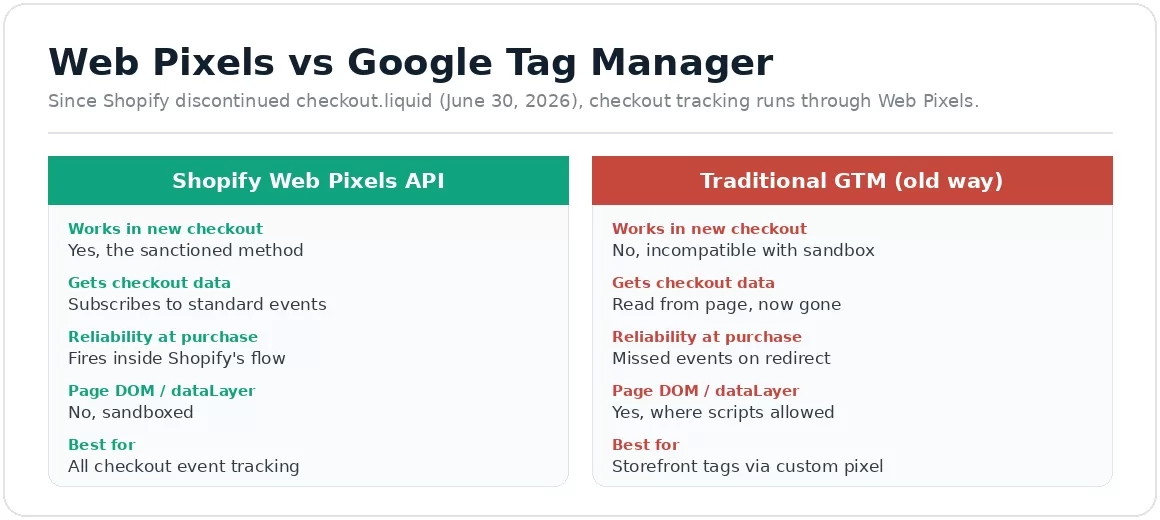
Since Shopify’s checkout extensibility rollout (checkout.liquid sunset in 2025; Shopify Scripts on June 30, 2026), Web Pixels is the sanctioned method.
So how should I track my Shopify store now?
Use the Web Pixels API as the foundation for checkout tracking, through official channel apps where they exist, and custom pixels for everything else. You can still use GTM, but route it through a custom pixel rather than a raw container.
The practical setup for most stores:
For GA4 and Google Ads: use Shopify’s official Google & YouTube app, the direct, supported path, no GTM required for the core events.
For Meta: use the official Facebook & Instagram app for the same reason.
For anything without an official app, or custom needs: build a custom pixel under Settings, Customer Events, subscribing to the events you need.
If you rely on GTM: you can add your GTM snippet inside a custom pixel, so it runs in the sandbox and receives the Customer Events, rather than firing a raw container on the page.
For maximum accuracy: add server-side tracking (via tools that route checkout events server-side), which also helps with the browser losses covered in why GA4 revenue doesn’t match Shopify.
Do I still need Google Tag Manager at all?
Maybe, but not the way you used it before. For core GA4 and ads tracking, Shopify’s official apps often remove the need for GTM entirely. GTM still helps for complex, multi-tag storefront setups, run through a custom pixel.
There’s no single right answer, it depends on your complexity. A straightforward store is often better served by the official apps, which are simpler and supported. A store with many tags, custom events, or specific data-layer needs may still want GTM’s control, but implemented the modern way (inside a custom pixel), not as a raw container on the checkout. The key mindset shift: GTM is no longer the foundation of Shopify tracking; the Web Pixels API is, and GTM, if used, sits on top of it.
We rebuild checkout tracking on the method Shopify actually supports now, then verify it with real orders.
We move event tracking onto the Web Pixels API (official apps where they exist, custom pixels where they don’t), route any GTM needs through a custom pixel, and add server-side tracking for accuracy. Then we place test orders to confirm every event fires once, with the right data.
It’s the same baseline-first discipline behind our conversion optimization work: get the tracking right first, because a broken checkout event quietly corrupts every report you rely on.
Frequently asked questions
Does Google Tag Manager still work on Shopify?
Partly. GTM can still manage storefront tags, but it can’t fire freely in the new sandboxed checkout, and raw containers are incompatible there. To track checkout events with GTM now, you route it through a Shopify custom pixel rather than installing the container directly.
What replaced checkout.liquid and Shopify Scripts?
Checkout extensibility. checkout.liquid and additional scripts were sunset in 2025 (and August 26, 2026 for non-Plus stores), and Shopify Scripts on June 30, 2026. Visual changes now use Checkout UI Extensions, and all event tracking uses the Web Pixels API (custom pixels or official channel apps).
Is the Web Pixels API better than GTM for tracking?
For checkout events, yes, it’s the supported method and misses fewer purchase events because it fires from inside Shopify’s flow rather than depending on a redirect. For general tag management it’s not a direct replacement; the two work at different layers.
Why did my tracking break after a Shopify update?
Almost certainly the checkout change. If your tags fired on the thank-you page URL, that page no longer carries the order data they expected, it’s behind the Web Pixel sandbox now. The tag fires but comes back empty, so revenue and conversions drop in your reports.
Keep reading
Sources
Every statistic is traced to its original publisher and dated. The GA4-vs-Shopify gap is corroborated across multiple independent 2025 to 2026 analyses; the Shopify checkout changes are from Shopify’s own documentation and migration guides. Figures that could not be traced to a primary source were left out.
Shopify Web Pixels API is the sanctioned method for checkout event tracking; runs sandboxed, subscribes to standard events (checkout_completed, payment_info_submitted, etc.); no DOM or dataLayer access. https://weltpixel.com/blogs/news/shopify-checkout-extensibility-and-conversion-tracking-what-broke-what-did-not ; Shopify Customer Events documentation.
checkout.liquid and additional scripts sunset for Thank you/Order status pages in 2025 (August 26, 2026 for non-Plus); Shopify Scripts sunset June 30, 2026; GTM containers incompatible with the new sandbox; official Google & YouTube and Facebook & Instagram apps are the supported paths; custom pixels for other tracking. https://revize.app/blog/shopify-checkout-extensibility-migration-guide ; https://monkeyman.agency/insights/shopify-checkout-extensibility-conversion-tracking/