WooCommerce / CRO
WooCommerce Checkout Optimization
// fewer steps, fewer surprises

By Fracto Solutions
September 7, 2026
The short answer
To optimize a WooCommerce checkout, fix five things in order: enable guest checkout, remove unnecessary fields, show all costs before the final step, add trust signals, and offer the payment methods shoppers want. WooCommerce’s default checkout is often longer than it needs to be, so streamlining it usually recovers sales.
To optimize a WooCommerce checkout, fix five things in order: enable guest checkout, remove unnecessary fields, show all costs before the final step, add trust signals, and offer the payment methods shoppers want. WooCommerce’s default checkout is often longer than it needs to be, so streamlining it usually recovers sales.
Checkout is where the most committed shoppers are lost, and WooCommerce’s default checkout often adds friction a streamlined one removes. Because you control the checkout on WooCommerce, you also have the power to fix it, more so than on locked-down platforms. This guide covers what to optimize, in priority order. It’s the checkout deep-dive under why your WooCommerce store gets traffic but no sales; the cross-platform principles are in the checkout optimization framework.
Why do shoppers abandon the WooCommerce checkout?
For the same reasons they abandon any checkout, surprise costs, forced accounts, and too much friction, plus WooCommerce’s default flow can be longer and less streamlined than it needs to be.
Why shoppers abandon at checkout
Reason
Share citing it
Extra costs too high (shipping, tax, fees)
40%
Delivery was too slow
20%
Didn't trust the site with card details
19%
Site wanted them to create an account
18%
Checkout too long or complicated
17%
Source: Baymard Institute, cart abandonment research. Excludes shoppers who were only browsing, who are the largest group overall but were never going to buy on that visit. Respondents could pick more than one reason, so these do not sum to 100%. Baymard revises this page periodically and a later revision reports slightly different splits (39%, 21%, 19%, 19%, 18%); re-check the live page and record the date you verified it.
The abandonment triggers are universal. Across studies, the top reasons shoppers abandon at checkout (excluding those just browsing) are unexpected extra costs (cited by 40%), delivery being too slow (20%), card-security distrust (19%), being forced to create an account (18%), and a checkout that’s too long or complicated (17%). WooCommerce doesn’t cause these, but its default checkout, and the way many stores leave it unoptimized, can amplify them: extra fields, no guest option, or a multi-step flow that asks too much. The fixes below target each, in order of typical impact.
- WooCommerce checkout fixes
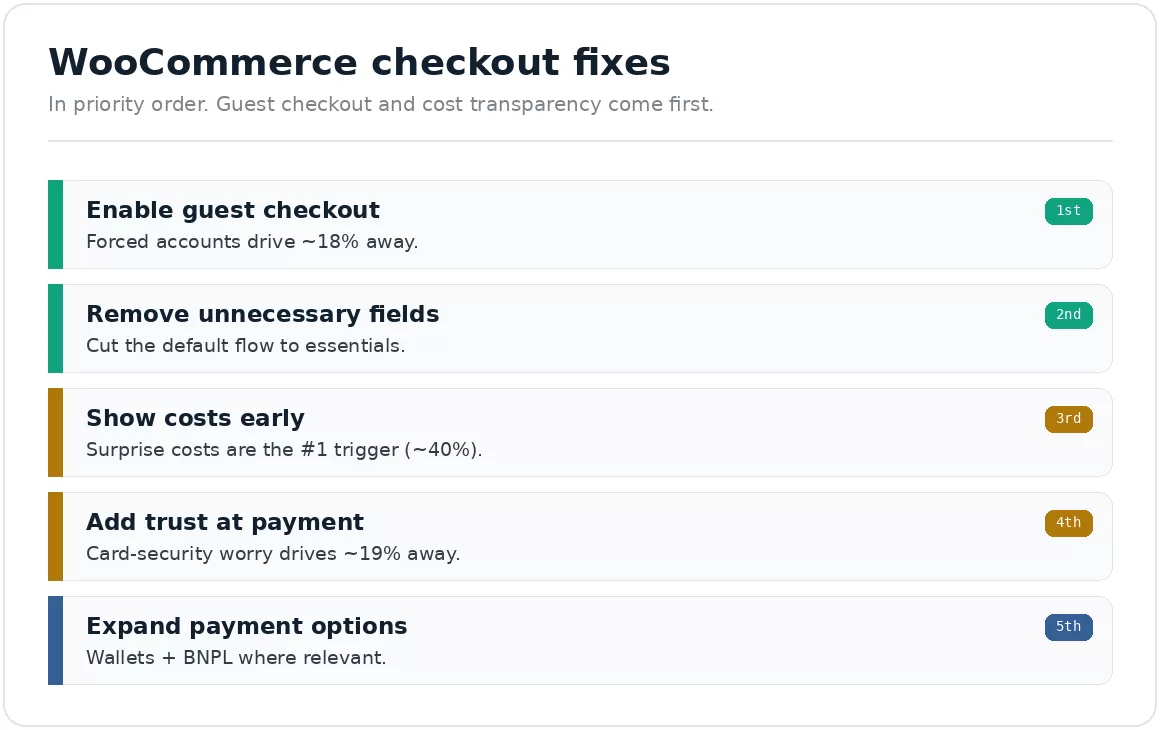
In priority order. Guest checkout and cost transparency come first.
Should I enable guest checkout?
Let people buy without creating an account. Forced account creation drives away a meaningful share of shoppers, and it’s often on by default settings that stores never revisit.
Requiring an account before purchase is one of the most common and most damaging checkout mistakes. Roughly 18% of shoppers abandon when forced to create an account, they want to buy, not join. In WooCommerce, make sure guest checkout is enabled in your settings so customers can complete a purchase with just the essentials. You can always invite them to create an account after the sale, once they’ve already converted. This single change often recovers a surprising number of orders.
Which checkout fields should I remove?
Cut the checkout to what you actually need. Every extra field is friction and a chance to give up.
WooCommerce’s default checkout collects more than many stores require, for example, asking for a company name or a second address line that isn’t needed for your products. Each field adds effort and cognitive load at the exact moment the shopper is deciding whether to finish. Audit your checkout and remove or hide anything non-essential. Enable address autofill where you can. The goal is the shortest honest path from cart to confirmation, fewer fields consistently means fewer drop-offs.
When should I show shipping and tax?
Reveal shipping and any fees early, on the cart or at the start of checkout, not as a surprise at the end. Unexpected costs are the number one abandonment trigger.
Surprise costs at the final step break the deal at the moment of commitment, they’re the single most-cited reason shoppers abandon (40%). The fix is transparency: show estimated shipping and the full total before the last checkout screen, ideally on the cart page. A free-shipping threshold cue (“you’re $12 away from free shipping”) reframes shipping as a goal and can lift average order value too. In WooCommerce, make sure shipping is calculable or clearly stated early rather than appearing only at the end.
What trust signals belong at checkout?
Reassure shoppers exactly where they hesitate, entering payment details. Card-security concerns drive shoppers away, and visible trust signals counter that.
At the payment step, shoppers weigh whether to trust you with their card, roughly 19% abandon over card-security concerns. Counter it directly: show security badges, a visible return policy, clear contact information, and recognizable payment logos. On WooCommerce, ensure your checkout uses a secure, trusted payment gateway and displays that it’s secure. None of this changes your product, it changes how safe the shopper feels at the decision point, which is often the difference between a completed and abandoned order.
Which payment methods should I offer?
Include the options your customers expect, cards plus digital wallets and, where relevant, buy-now-pay-later. A missing preferred method is a silent abandonment cause.
When a shopper’s preferred payment option isn’t available, some simply leave. WooCommerce supports many gateways and wallets, so make sure you offer more than just basic card entry: digital wallets (which also speed up mobile checkout by removing manual typing), and buy-now-pay-later for higher-value carts if it suits your market. The goal is that no shopper abandons simply because they couldn’t pay the way they wanted, especially on mobile, where fast wallet payment matters most.
What should I fix first?
Guest checkout and cost transparency. They target the two biggest abandonment causes (forced accounts and surprise costs) and are usually quick to change in WooCommerce. Then fields, trust, and payment options.
If your time is limited, enable guest checkout and show costs early, those two alone recover a meaningful share of lost orders because they address the top documented triggers. Then trim fields, add trust signals, and expand payment methods. And measure: check your checkout completion rate before and after each change so you know what worked, rather than assuming.
We find where value leaks, fix the highest-impact issue first, and prove the gain in your own numbers.
That is the same baseline-first method behind our conversion optimization work: confirm the data is trustworthy, fix the biggest leak, then prove the gain in your own reporting.
Frequently asked questions
Does WooCommerce have guest checkout?
Yes, it’s a setting. Make sure it’s enabled so shoppers can buy without creating an account, forced account creation is a top abandonment cause (around 18%). You can invite them to create an account after the purchase instead.
Why is my WooCommerce checkout losing sales?
Usually the universal triggers, surprise costs, forced accounts, or too many fields, sometimes amplified by WooCommerce’s default flow being longer than needed. Diagnose where in checkout shoppers drop, then fix the biggest cause first.
Should I use a one-page checkout plugin for WooCommerce?
It can help by reducing steps, but the fundamentals matter more: guest checkout, few fields, early cost transparency, trust, and payment options. Fix those first; a one-page layout is a bonus, not a substitute for removing the actual friction.
How do I know if my checkout changes worked?
Measure your checkout completion rate (and step-by-step drop-off) before and after each change, and A/B test where you have the traffic. Session recordings show where shoppers still hesitate, pointing to the next fix.
Sources
Baymard Institute, checkout abandonment reasons (excluding “just browsing”): extra costs 40%, delivery too slow 20%, card-security distrust 19%, forced account creation 18%, complicated checkout 17%. Baymard revises this page periodically and a later revision reports slightly different splits (39%, 21%, 19%, 19%, 18%), so re-check the live page and record the date you verified it. https://baymard.com/lists/cart-abandonment-rate