Paid / Meta
Meta Ads Getting Clicks but No Sales? Here's Why
// the clicks work; the destination doesn't

By Fracto Solutions
September 25, 2026
The short answer
Meta ads getting clicks but no sales usually means the problem is after the click: a mismatch between the ad and the landing page, traffic that isn’t ready to buy, or a site that doesn’t convert. Clicks prove the ad works; no sales points to the landing page, the offer, or targeting.
Clicks
#1
Mobile
If I'm getting clicks, why no sales?
Because clicks and conversions are different problems. Clicks mean your ad and targeting got attention; no sales means something after the click failed, the landing page, the offer, the price, or the site experience. The ad did its job; the destination didn’t.
This reframe is the key to the whole diagnosis. An ad that earns clicks has already proven it can stop the scroll and generate interest, so the creative and hook are working. The breakdown is happening later in the chain: click to landing page to product to cart to checkout. Somewhere in there, interested shoppers are dropping. So instead of endlessly tweaking the ad (which is working), look at where the click lands and what happens next. That’s almost always where “clicks but no sales” is really coming from.
Does my landing page match my ad?
This is the most common cause. If the ad promises one thing and the landing page shows another, or drops the shopper on a generic homepage, the visitor gets confused and leaves. The page must continue the ad’s specific promise.
Ad-to-page mismatch (poor “message match” or “scent”) is the number-one reason clicks don’t convert. If your ad shows a specific product with a specific hook and the click lands on your homepage, or a cluttered category page, or a product that looks or reads differently from the ad, the shopper has to re-orient, and many just bounce. The fix is continuity: send the click to a page that matches the ad exactly, the same product, the same offer, the same visual and message the ad promised. Every extra step or moment of “wait, is this the right thing?” leaks conversions. Match the page to the ad and a chunk of the problem often disappears.
Is my targeting bringing the wrong people?
Possibly. Meta can get you cheap clicks from people who engage but never intended to buy. If your targeting or creative attracts browsers rather than buyers, you’ll see high clicks and low sales, the traffic simply isn’t purchase-intent.
Not all clicks are equal. Meta’s optimization can, if pointed at the wrong objective or audience, deliver lots of cheap clicks from people who like content but don’t buy, engagement without intent. Two things to check. First, your campaign objective: if you’re optimizing for clicks or traffic rather than purchases/conversions, Meta will faithfully find click-happy users, not buyers, so optimize for conversions once you have enough conversion data. Second, your audience and creative: broad, curiosity-driven creative can pull in browsers, while creative that speaks to genuine purchase intent attracts buyers. If clicks are cheap but never convert, mismatched intent is a prime suspect.
Is the problem actually my website?
Very often, yes. Meta ads send qualified traffic to your site, but your site does the converting. A slow page, a confusing product page, a clunky mobile experience, or a high-friction checkout will kill conversions no matter how good the ads are.
This is where paid and conversion optimization meet. If your landing page matches the ad and your targeting is sound but sales still don’t come, the issue is on-site. The usual culprits are the same ones that hurt any store: slow load (especially on mobile, where most Meta traffic is), product pages that don’t build confidence, and a checkout with unnecessary friction. Since Meta traffic skews heavily mobile, mobile problems hit these campaigns hardest, a desktop-fine site can be quietly failing the phone users your ads are sending. Diagnose it like any conversion issue: check your conversion rate by device, watch session recordings of ad traffic, and fix the biggest leak. The method is in how to diagnose Shopify conversion issues, and mobile specifically in mobile conversion optimization.
Could it be my offer or price?
Yes. Sometimes the ad, page, and site are all fine, but the offer doesn’t compel or the price isn’t competitive for the audience the ad attracted. Clicks come from interest; sales need the deal to make sense once they see the full picture.
If everything upstream checks out, look at the offer itself. A shopper clicks because the ad sparked interest, but converts only if the value adds up when they see the price, shipping, and terms. Common offer problems: the price is higher than the ad implied, shipping costs surprise them at checkout (the number-one abandonment trigger), or the offer simply isn’t differentiated enough versus alternatives they’ll compare against. This isn’t about slashing prices, it’s about making sure the value is clear and there are no nasty surprises. Sometimes a stronger offer (a bundle, a threshold-based free shipping deal, a clearer guarantee) converts the same clicks that were bouncing.
Cause
The tell
The fix
Ad-to-page mismatch
Click lands on homepage or a different-looking page
Match the page to the ad's exact promise
Wrong targeting / objective
Cheap clicks, no purchases; optimizing for traffic
Optimize for conversions; target buyer intent
Site doesn't convert
Conversion rate low, especially on mobile
Fix speed, product page, checkout friction
Offer / price
Value doesn't add up once they see total
Clearer offer, no surprise costs
Clicks prove the ad works, so start after the click. Fix the first broken link.
How do I diagnose it step by step?
Work down the chain: confirm the clicks are real, check ad-to-page match, check targeting intent, then check on-site conversion and the offer. Fix the first broken link you find, because everything downstream depends on it.
A practical sequence: – Confirm the clicks and tracking are real. Rule out click fraud or a broken conversion pixel (no sales tracked doesn’t always mean no sales, verify against Shopify). – Check message match. Does the landing page continue the ad’s exact promise? Fix mismatches first. – Check targeting and objective. Are you optimizing for purchases, and attracting buyers, not just browsers? – Check on-site conversion. Conversion rate by device, session recordings of ad traffic, speed, checkout friction. – Check the offer and price. Does the value add up once they see everything?
Fix in that order. Most “clicks but no sales” problems resolve at the message-match or on-site stage, which is why tweaking the ad rarely helps.
- Clicks but no sales
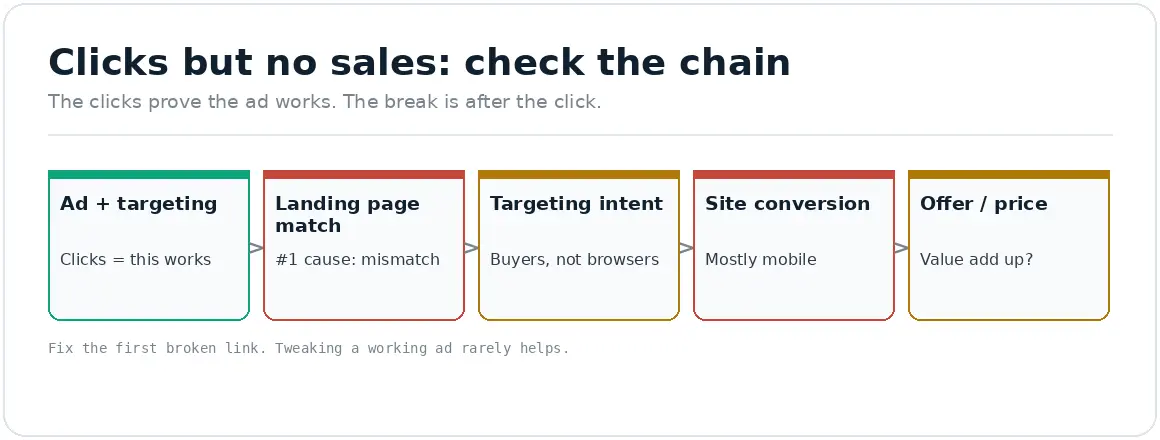
The clicks prove the ad works. The break is after the click.
We find where the click leaks, then fix that, not the working ad.
We check message match, targeting intent, on-site conversion (especially mobile), and the offer, then fix the first broken link, because tweaking an ad that already earns clicks rarely solves a downstream problem.
It’s part of our paid advertising work, inseparable from the conversion optimization that makes the landing page actually convert.
// we would rather show up in your reporting than in your inbox
Frequently asked questions
Why are my Meta ads getting clicks but no sales?
Because the problem is usually after the click, not the ad (the clicks prove the ad works). The common causes are an ad-to-landing-page mismatch, targeting that attracts browsers not buyers, a site that doesn’t convert (especially on mobile), or an offer that doesn’t add up at the price shown.
Should I change my ad if it gets clicks but no sales?
Usually not first. An ad earning clicks is doing its job. Look instead at where the click lands (does the page match the ad?), your targeting and objective (buyers or browsers?), and your on-site conversion. Changing a working ad rarely fixes a downstream problem.
Does landing page matter for Meta ads?
Enormously. Ad-to-page mismatch is the most common reason clicks don’t convert. The page must continue the ad’s exact promise, same product, same offer, same message, rather than dropping the shopper on a generic homepage or a page that looks different from the ad.
Could my website be why Meta ads don't convert?
Very likely, if the ad and page match but sales still don’t come. Meta traffic is mostly mobile, so a slow or clunky mobile site, weak product pages, or a high-friction checkout will kill conversions the ads are paying to generate. Diagnose conversion by device and fix the biggest leak.
Sources
Unexpected shipping cost is the top checkout abandonment trigger (Baymard); mobile skew of social traffic: see the checkout and mobile clusters and their sources.