SEO / Shopify
Technical SEO Checklist for Shopify Stores
// fix the foundation before the refinements

By Fracto Solutions
September 4, 2026
The short answer
A Shopify technical SEO checklist covers five areas: site speed and Core Web Vitals, crawlability and indexation, structured data, mobile-friendliness, and clean site architecture. Work through them in order of impact, speed and crawlability first, because if engines can’t crawl your pages or shoppers bounce off slow ones, nothing else ranks.
Shopify handles a lot of technical SEO for you, but not everything, and the gaps are where stores quietly lose rankings. This checklist covers what to actually check and fix, grouped by area and ordered by impact. It’s the technical deep-dive under the broader ecommerce SEO guide.
- Technical SEO checklist, by area
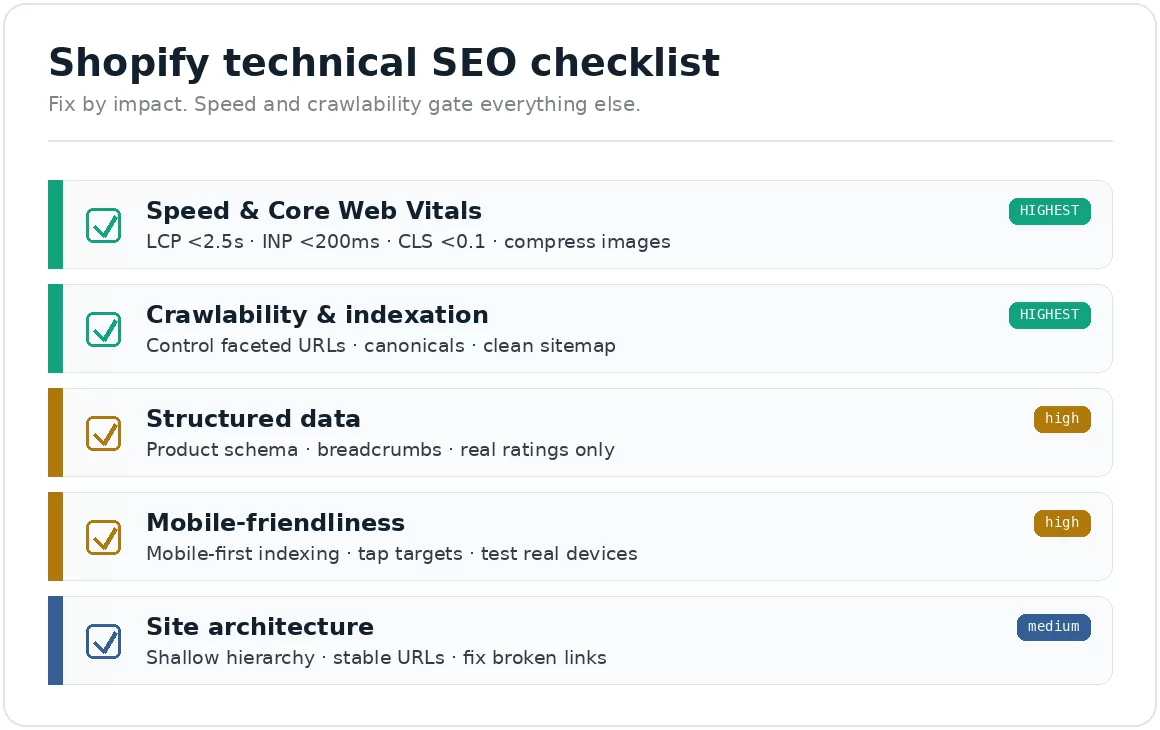
Fix by impact, not top to bottom. Speed and crawlability gate everything else, so they’re highest priority
How do I use this checklist?
Work by impact, not top to bottom. Speed and crawlability affect everything else, so fix those first, then structured data, mobile, and architecture.
A page engines can’t crawl, or one so slow shoppers leave, costs far more than a missing breadcrumb. Scan the list, note what applies, and fix the foundation before the refinements. Google Search Console shows crawl and indexing problems for free.
How fast does a Shopify store need to be?
Both a ranking consideration and a major conversion factor, so the highest-priority technical area.
Meet Core Web Vitals: LCP under 2.5s, INP under 200ms, CLS under 0.1, on real users at the 75th percentile.
Compress and size images, usually the biggest speed drag. Modern formats, lazy-load below the fold.
Limit heavy apps and scripts. Every app can add code; audit and remove what you don’t need.
Check your theme’s performance, some are far heavier than others.
Speed’s effect on sales: how Shopify speed impacts conversion rate.
Core Web Vitals thresholds (Google documentation)
Metric
What it measures
Good
Needs work
Poor
LCP
Loading: when the largest element renders
under 2.5s
2.5s to 4.0s
over 4.0s
INP
Responsiveness: delay before the page reacts
under 200ms
200ms to 500ms
over 500ms
CLS
Visual stability: how much the layout jumps
under 0.1
0.1 to 0.25
over 0.25
Source: Google, Core Web Vitals thresholds, web.dev. Each metric is assessed at the 75th percentile of real page views, so 75% of visits must hit the Good threshold for the page to pass. Field data, not a lab score. Note also that Core Web Vitals are used by Google’s ranking systems but Google describes them as closer to a tiebreaker than a major factor, and they do not override relevance, so treat this as a floor to clear rather than a lever to pull.
How do I make sure Google can crawl my catalog?
Make sure engines can find and index the pages you want ranked, and aren’t wasting effort on the ones you don’t.
Control faceted navigation. Filters and sorts can generate thousands of near-duplicate URLs that waste crawl budget.
Use canonical tags to consolidate duplicate or variant URLs.
Keep your XML sitemap clean and submit it in Search Console.
Audit robots settings so you’re not blocking important pages.
Fix crawl errors flagged in Search Console promptly.
What structured data does a Shopify store need?
Add accurate Product schema so pages are eligible for rich results. Not a ranking signal, but it can improve how listings appear.
Add Product schema with the right required fields for the experience you want. For product snippets, Google requires only name plus one of offers, review, or aggregateRating. For merchant listings, which apply when shoppers buy directly from your page, you also need image and an offers block with price and priceCurrency. Most Shopify stores want merchant listings. availability is recommended, not required, but include it anyway since it keeps stock status accurate in results.
Add BreadcrumbList on category and product pages.
Add Aggregate Rating only with real reviews, never fabricate ratings or prices.
Validate with Google’s Rich Results Test after adding.
Many themes and apps add some schema automatically; check before adding more, to avoid duplicates.
Why does mobile matter more than desktop?
Most traffic and Google’s indexing are mobile-first, so the mobile experience is the one that counts. Test on real devices.
Confirm mobile-first rendering, Google predominantly uses the mobile version for indexing.
Check tap targets and legibility, reachable buttons, readable text.
Verify mobile speed separately, mobile is usually slower than desktop.
Test real devices, a shrunk desktop preview hides most issues.
How should my store be structured?
A clean, shallow structure helps engines and shoppers find pages. Keep important pages a few clicks from home.
Logical hierarchy: home to category to product, with clear internal linking.
Descriptive, stable URLs; if you must change one, 301-redirect old to new.
Internal links with descriptive anchors to spread ranking signals.
Fix broken links and orphan pages.
What should I fix first?
Speed and crawlability, in that order. They gate everything else.
Get Core Web Vitals into the green and make sure engines can crawl and index key pages without wasting budget on faceted URLs. Those deliver the most, for rankings and (with speed) conversion. Then structured data, mobile, architecture. Search Console and the Rich Results Test are free and show you what needs attention.
We fix the technical foundation, then prove it in traffic and sales.
We audit crawlability, speed, and structured data against Google’s documented standards, fix what’s costing you rankings, and connect it to conversion optimization, because ranking a slow page just sends more people to a bad experience.
On one engagement, getting the foundation right and rebuilding the buying path lifted conversion 6% and revenue per visitor 7%, A/B tested at 95% confidence.
Frequently asked questions
Does Shopify handle technical SEO automatically?
Partly. It generates sitemaps, canonicals, and responsive themes, covering the basics. Speed, faceted-navigation crawl control, and complete structured data usually need manual attention.
What's the most important technical SEO factor for Shopify?
Speed and crawlability. If shoppers bounce off slow pages or engines can’t crawl your catalog efficiently, other optimizations can’t compensate. Speed also affects conversion, so it pays twice.
Is structured data required for Shopify SEO?
Not required but strongly recommended. Accurate Product schema makes pages eligible for rich results. It’s not a ranking signal, and markup must reflect real, visible data.
How do I check my store's technical SEO?
Google Search Console (crawl/indexing), PageSpeed Insights (Core Web Vitals), and the Rich Results Test (structured data) are free and cover most of it.
Keep reading
Sources
Google Search Central, product structured data documentation — developers.google.com
Google, Core Web Vitals thresholds — web.dev
Google, mobile-first indexing documentation — developers.google.com